
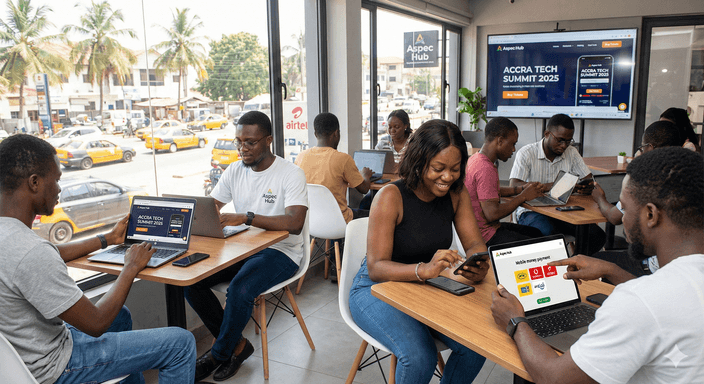
You can set up event ticketing in Ghana in an afternoon. Create an organizer account, verify your phone number, add a payout account, build your event and ticket tiers, and submit it for approval. Once it is live, share one link, scan tickets at the gate with a free phone app, and withdraw your earnings to Mobile Money or a bank account.
This checklist follows Aspec Hub's own organizer documentation, step by step, so you know exactly what each screen will ask for. Gather the items in the first table before you start, and the setup goes quickly.
TL;DR
- Have your event details, images, ticket tiers, and payout details ready before you start.
- Verify your phone number first. You cannot create an event without it.
- Every new event is reviewed and marked Pending until it is approved, so submit early.
- Buyers pay by Mobile Money, card, or USSD and get a QR or barcode ticket.
- Event creation is free. Aspec Hub takes 5% on paid sales, and free events stay free.
Before You Start: What to Have Ready
| Item | Why you need it | Tip |
|---|---|---|
| Event title and description | Shown on your event page | Say what, where, and who in the first line |
| Event image | Shown on your event page | Use a clear, uncluttered poster |
| Date, venue name, and venue location | Required event details | Be precise, so buyers can find the venue |
| Ticket tiers and prices | Your pricing plan | Decide on Early Bird, Regular, VIP, and any free tiers |
| Sales start and end times | When tickets can be bought | End sales before doors open |
| Phone number | Verification by one-time code | Use a number you can receive SMS on |
| Mobile Money or bank details | Your payout account | The name should match your account |
| Organization cover image and logo | Your organizer profile | Cover under 5MB, landscape, ideally 1200 x 400px. Square logo. |
Step 1: Create Your Organizer Account
Go to the Aspec Hub organizer dashboard and sign up with your email and a password, or with Google. Verify your email using the link sent to you, then click I have verified. If the email does not arrive, click Resend Email (Aspec Hub documentation).
Next, set up your organization profile in three parts:
- Basic information: organization name, description, email, and a username that starts with @, such as @yourbrand.
- Contact details: a phone number (required), plus optional website and social media links.
- Branding: a landscape cover image under 5MB and a square logo.
Click Submit, and you land on your dashboard.
Step 2: Verify Your Phone Number
Open the Event or Vote Form tab and click Add phone number. Aspec Hub sends you a one-time code (OTP). Enter it to verify your number. If the code is slow to arrive, you can dial 92801# to check it (Aspec Hub documentation).
You must finish this step before you can create events or voting contests.
Step 3: Add Your Payout Account
Go to the Payouts tab and click Add Payout Account. Choose Mobile Money or a bank account, enter your details, and click Add. Your account details are verified automatically, and you get an SMS and email when the payout account is added (Aspec Hub documentation).
You can create events before you add a payout account, but adding it now saves a rush later. If you ever change it, Aspec Hub asks for a one-time code sent to your phone.
Step 4: Create Your Event
Open the Event Ticketing tab and click New Events. The documentation lists what the form asks for (Aspec Hub documentation):
- Event title, description, and image
- Event date and location, including the venue name and venue location
- Ticket sales start time and end time
- An event category
- Organizer details: turn on Is Me if you are the organizer, or enter the organizer's name
- Event tags, so people can find your event
- A ticket scanning style: QR Code or Bar Code
- A ticket pricing service from the options shown
Click Create. Your event is marked Pending while the Aspec Hub team reviews it, and you get an email when it is approved or rejected.
Step 5: Set Up Your Ticket Tiers
Tiers let you charge different prices for different buyers. You can create several tiers for one event, such as Early Bird, Regular, VIP, Student, Table Package, or Group. Each tier can have its own price, quantity limit, and sales window, and you can mix free and paid tiers in the same event (Aspec Hub FAQ).
A simple structure that works for most events:
- Early Bird: a lower price with a small quantity and an early end date, to build momentum.
- Regular: your main price for most buyers.
- VIP or Table: a higher price with a clear benefit, such as seating or a table for a group.
- Free or guest tier: for sponsors, press, and invited guests, so they still get a scannable ticket.
Before you publish, write a short refund rule. Our guide to event refund policy explains what to include.
Step 6: Know How Buyers Will Pay
Buyers can pay with Mobile Money, a debit or credit card, or USSD (Aspec Hub FAQ). Mobile money is the big one. Transactions reached GH¢518.8 billion in August 2026, across 85.8 million registered accounts (Bank of Ghana, September 2026). For more on getting paid quickly, read about mobile money ticketing.
USSD matters too. About 74.6% of Ghana's population was online at the end of 2025 (DataReportal, 2026), so roughly one in four people were not. For events that include USSD service, buyers can purchase without data (Aspec Hub documentation):
- Dial the Aspec Hub USSD code. It works on all mobile networks.
- Select Buy Event Tickets.
- Enter the event's USSD code.
- Choose a ticket type and confirm the price.
- Enter full name, phone number, and email address.
- Pay, then receive the ticket by SMS and email.
Print these steps on your posters if your audience includes people without smartphones.
Step 7: Share Your Event Link
Once your event is approved, you have one link to share. Post it in your broadcast lists and group chats, in your social media bios, and in short-video captions (Aspec Hub). Buyers get their QR ticket as soon as payment clears.
A few habits that help:
- Pin the link at the top of every post.
- Announce when Early Bird ends, a day before it does.
- Share a short video of the venue or the line-up in the final week.
- Ask performers and partners to share the same link.
Step 8: Set Up Gate Scanning
Download the free Aspec Hub scanner app on Android or iOS, log in as the organizer, and scan each ticket at the entrance. The app validates tickets in real time, keeps working offline, and flags a code that has already been used (Aspec Hub FAQ).
Phones are enough. In one Aspec Hub case study, a 4,000-guest awards ceremony in Accra cleared its door in 11 minutes, down from about 90 minutes, using four scanners on staff phones and no extra staff (Aspec Hub case study). For a full gate plan, see our guide to QR code ticket scanning.
Step 9: Withdraw Your Earnings
From the Payouts tab, click Withdrawal, confirm your payout account, enter the amount, add an optional note, and click Submit Request (Aspec Hub documentation).
| Withdrawal detail | What applies |
|---|---|
| Charge to Mobile Money | GHS 1.00 |
| Charge to a bank account | GHS 8.00 |
| Minimum per withdrawal | GHS 20.00 |
| Maximum per withdrawal | GHS 10,000.00 |
| Usual delivery time | 10 to 20 minutes, sometimes up to 12 hours |
You get an SMS and email after each request. A withdrawal shows as Pending, Processing, Completed, or Rejected. Rejections can happen for invalid account details, security, or compliance reasons.
Your Printable Pre-Launch Checklist
- Organizer account created and email verified
- Organization profile, cover image, and logo submitted
- Phone number verified
- Payout account added and confirmed
- Event created with correct date, venue, and sales window
- Ticket tiers set with prices, quantities, and sales windows
- Refund rule written and published
- Event approved (no longer Pending)
- Test ticket bought on Mobile Money and card
- USSD steps printed on posters, if your event includes USSD
- Scanner app installed and tested on every gate phone
- Event link shared on all your channels
FAQ
How much does it cost to set up event ticketing on Aspec Hub?
Creating an event is free, with no setup fee and no monthly subscription. Aspec Hub takes a flat 5% on successful paid ticket sales, and free events and free ticket tiers stay free.
Do I need a payout account before I create an event?
No. You can create events before you add a payout account. You do need to verify your phone number first, and you need a payout account before you can withdraw your earnings.
Why is my event marked Pending?
Every new event is reviewed by the Aspec Hub team before it goes live. You receive an email when your event is approved or rejected.
Can buyers without internet buy tickets?
Yes, for events that include USSD service. Buyers dial the Aspec Hub USSD code, choose Buy Event Tickets, enter the event's USSD code, pick a ticket type, and pay. They receive their ticket by SMS and email.
How do I check tickets at the entrance?
Download the free Aspec Hub scanner app on Android or iOS, log in as the organizer, and scan each QR code or barcode. The app validates tickets in real time and keeps working offline.
How long do withdrawals take?
Withdrawals usually take 10 to 20 minutes to arrive, and some can take up to 12 hours. Each withdrawal must be between GHS 20 and GHS 10,000.
Next Steps
Work through the checklist in order, and leave time for the approval step before you announce your event. If your event also has a public vote, you can run voting and ticketing for the same event from the same dashboard. Still comparing options? Use our scorecard for ranking ticketing platforms.
Ready to set up your first event? Start for free on Aspec Hub ticketing. If you get stuck, contact Aspec Hub support at support@aspechub.com or +233 500 221 992.
Suggested Internal Links
- Aspec Hub ticketing: free event setup and 5% on paid sales.
- Best event ticketing platform ranking: the 10-point scorecard: comparing platforms fairly.
- Online voting and event ticketing for the same event: adding a public vote to your event.
- Event refund policy rules for Ghanaian organizers: what to publish before you sell.
- Mobile money ticketing in Ghana: getting paid faster.
- QR code ticket scanning without extra equipment: running a fast gate.
Suggested Source Links
- Aspec Hub organizer documentation: every setup step in this checklist.
- Aspec Hub FAQ: payment methods, ticket tiers, and scanning.
- Bank of Ghana — Summary of Economic and Financial Data, September 2026: mobile money figures.
- DataReportal — Digital 2026: Ghana: internet use in Ghana.